css3怎么實現(xiàn)多個元素依次顯示效果-創(chuàng)新互聯(lián)
這篇文章主要介紹了css3怎么實現(xiàn)多個元素依次顯示效果,具有一定借鑒價值,感興趣的朋友可以參考下,希望大家閱讀完這篇文章之后大有收獲,下面讓小編帶著大家一起了解一下。

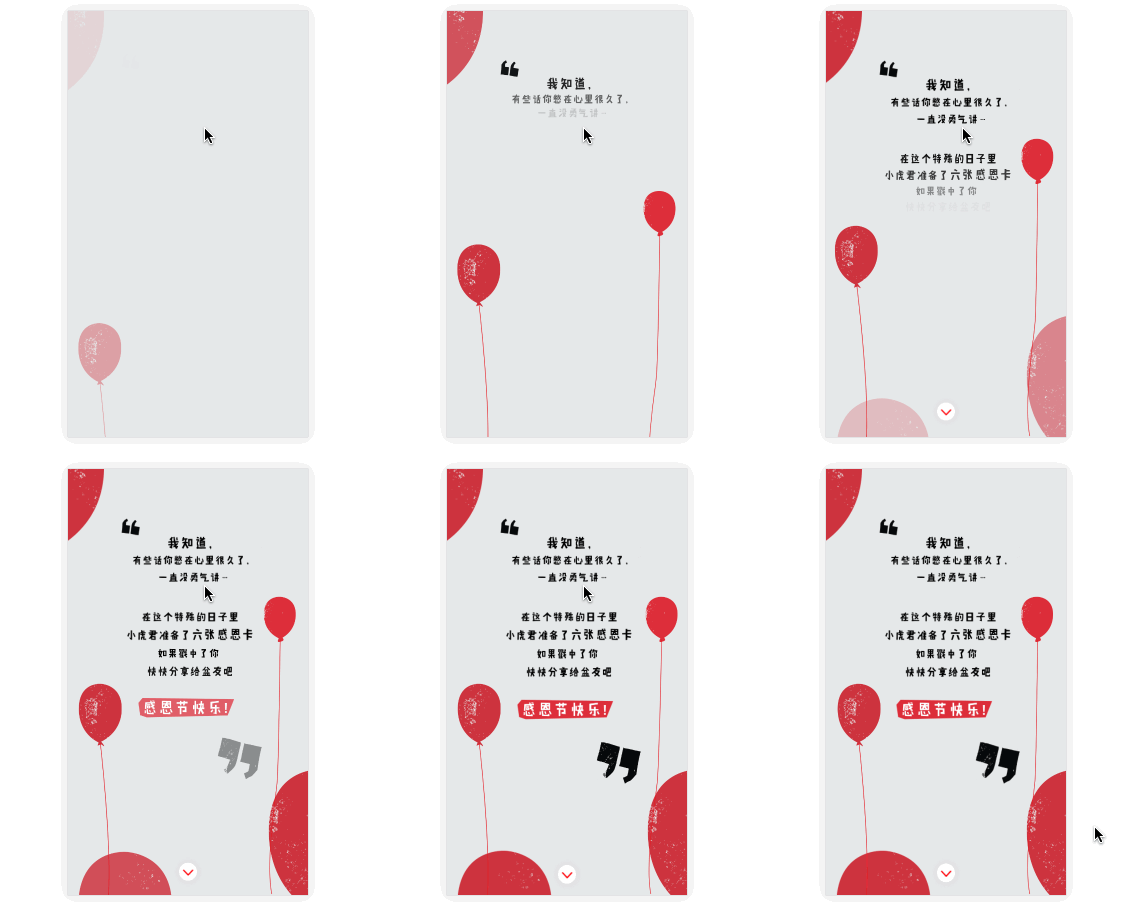
如上圖所示,在許多的活動宣傳html5中會經(jīng)常需要用到這樣的一個動畫效果。特別是快到年底了,也許有同學(xué)正在為了公司的活動頁面而忙碌,get到這樣一個小技能說不定剛好對你有幫助哦。
在css3中,我們使用animation與keyframes結(jié)合,可以給元素添加各種各樣的動畫效果。具體的動畫,在keyframes中定義,在animation中使用。例如可以定義一個從上飛入的動畫效果。
@keyframes topIn {
  from { transform: translateY(-50px) }
  to { transform: translateY(0px) }
}
并在目標(biāo)元素中通過animation來使用動畫。
<div class="target topIn"></div>
.topIn {
  animation: topIn 1s ease;
}
這樣,當(dāng)元素第一次渲染進入DOM時,就會有一個從上到下的位移動畫效果。當(dāng)然,這種效果并不是我們想要的。往往我們還在在動畫上加上一個透明度從0到1的漸變。
@keyframes topIn {
  from {
    transform: translateY(-50px);
    opacity: 0;
  }
  to {
    transform: translateY(0px);
    opacity: 1;
  }
}
我們還希望能夠控制元素的顯示時機應(yīng)該怎么辦?簡單一點的辦法就是在需要動畫效果展示時,才給目標(biāo)元素添加控制動畫的class樣式。
btn.addEventListener('click', function() {
  document.querySelector('.target').classList.add('topIn');
}, !1);
但是這樣做有一個問題。我相信實踐過的朋友都已經(jīng)發(fā)現(xiàn)過的。我們期望元素在入場之前,是處于看不見的狀態(tài)。但是僅僅只是上面的做法,動畫開始前元素是能夠被看見的。那么應(yīng)該怎么辦?
我們可以很簡單的想到,給元素添加 display: none 或者 visibility: hidden 。但是由于 display: none 之后,元素是不占位的。因此如果這樣的話,會導(dǎo)致頁面布局出現(xiàn)混亂。所以我們在開始之前,給元素添加一個新的class。
.aninode {
  visibility: hidden;
}
并且添加一個新的class讓元素顯示出來。
.animated .aninode {
  visibility: visible;
}
控制動畫效果的class也在css上進行一些調(diào)整。
.animated .topIn {
  animation: topIn 1s ease;
}
這樣做的好處是,我們只需要在class中添加一個 animated ,就能夠達(dá)到我們的效果。實例demo完整代碼如下:
<div class="container">
  <div class="target aninode leftIn"></div>
  <button class="btn show">show</button>
  <button class="btn hide">hide</button>
</div>
.container {
  width: 100px;
  margin: 0 auto;
}
.aninode {
  visibility: hidden;
}
.animated .aninode {
  visibility: visible;
}
.target {
  width: 100px;
  height: 100px;
  background: orange;
  border-radius: 4px;
  margin: 20px 0;
}
.animated .topIn {
  animation: topIn 1s ease;
}
.animated .leftIn {
  animation: leftIn 1s ease;
}
.btn {
  width: 100px;
  height: 30px;
  border: 1px solid #ccc;
  outline: none;
  transition: 0.1s;
}
.btn:active {
  border: none;
  background: orange;
  color: #fff;
}
@keyframes topIn {
  from {
    transform: translateY(-50px);
    opacity: 0;
  }
  to {
    transform: translateY(0px);
    opacity: 1;
  }
}
@keyframes leftIn {
  from {
    transform: translateX(-50px);
    opacity: 0;
  }
  to {
    transform: translateX(0px);
    opacity: 1;
  }
}
var show = document.querySelector('.show');
var hide = document.querySelector('.hide');
var container = document.querySelector('.container');
show.addEventListener('click', function() {
  container.classList.add('animated');
}, !1);
hide.addEventListener('click', function() {
  container.classList.remove('animated');
}, !1);
Demo顯示如下:
See the Pen <a href='https://codepen.io/yangbo5207/pen/NXKrPg/'>NXKrPg</a> by Ormie (<a href='https://codepen.io/yangbo5207'>@yangbo5207</a>) on <a href='https://codepen.io'>CodePen</a>.
codepen demo 地址
但是這樣離我們想要的效果好像還差一點點。繼續(xù)思考。首先想要后面的元素比前一個元素晚一點出現(xiàn),那么肯定是要控制延遲時間,我們就必須有許多設(shè)置延遲時間的class。
.delay200 {
    animation-delay: 200ms;
    animation-fill-mode: backwards!important;
}
.delay400 {
    animation-delay: 400ms;
    animation-fill-mode: backwards!important;
}
.delay600 {
    animation-delay: 600ms;
    animation-fill-mode: backwards!important;
}
.delay800 {
    animation-delay: 800ms;
    animation-fill-mode: backwards!important;
}
animation-fill-mode: backwards!important; 的目的是為了元素在出現(xiàn)之前,保持透明度為0的狀態(tài)。防止當(dāng)添加 animated 之后元素直接出現(xiàn)了。
加 !important 是為了防止在新的class中使用animation簡寫時對 animation-fill-mode 的屬性進行覆蓋改寫。如果此處不寫 !important 的話,那么在 topIn 這樣的動畫class中就不能使用簡寫形式。
這樣之后,我們只需要在css中添加上上述代碼,并對html做一些改動,就能夠?qū)崿F(xiàn)我們想要的效果了。
See the Pen <a href='https://codepen.io/yangbo5207/pen/mpbEEE/'>mpbEEE</a> by Ormie (<a href='https://codepen.io/yangbo5207'>@yangbo5207</a>) on <a href='https://codepen.io'>CodePen</a>.
codepen demo 地址
完整代碼如下:
<div class="container">
  <div class="targets aninode">
      <div class="item leftIn">春曉</div>
      <div class="item leftIn delay200">春眠不覺曉</div>
      <div class="item leftIn delay400">處處蚊子咬</div>
      <div class="item leftIn delay600">夜來風(fēng)雨聲</div>
      <div class="item leftIn delay800"><此處請留下你們的才華></div>
  </div>
  <button class="btn show">show</button>
  <button class="btn hide">hide</button>
</div>
.container {
  width: 200px;
  margin: 0 auto;
}
.aninode {
  visibility: hidden;
}
.animated .aninode {
  visibility: visible;
}
.targets {
  margin: 20px 0;
}
.targets .item {
    border: 1px solid #ccc;
    margin: 10px 0;
    line-height: 2;
    padding: 2px 6px;
    border-radius: 4px;
}
.animated .topIn {
  animation: topIn 1s ease;
}
.animated .leftIn {
  animation-name: leftIn;
  animation-duration: 1s;
}
.btn {
  width: 100px;
  height: 30px;
  border: 1px solid #ccc;
  outline: none;
  transition: 0.1s;
}
.btn:active {
  border: none;
  background: orange;
  color: #fff;
}
@keyframes topIn {
  from { transform: translateY(-50px) }
  to { transform: translateY(0px) }
}
@keyframes leftIn {
  from {
    transform: translateX(-50px);
    opacity: 0;
  }
  to {
    transform: translateX(0px);
    opacity: 1;
  }
}
.delay200 {
    animation-delay: 200ms;
    animation-fill-mode: backwards!important;
}
.delay400 {
    animation-delay: 400ms;
    animation-fill-mode: backwards!important;
}
.delay600 {
    animation-delay: 600ms;
    animation-fill-mode: backwards!important;
}
.delay800 {
    animation-delay: 800ms;
    animation-fill-mode: backwards!important;
}
var show = document.querySelector('.show');
var hide = document.querySelector('.hide');
var container = document.querySelector('.container');
show.addEventListener('click', function() {
  container.classList.add('animated');
}, !1);
hide.addEventListener('click', function() {
  container.classList.remove('animated');
}, !1);
我們發(fā)現(xiàn)js的邏輯并沒有發(fā)生任何改變。仍然僅僅只是在合適的位置添加/刪除animated。
彩蛋:
在實踐中我們還會遇到一個比較麻煩的事兒。就是延遲class的編寫。我們可能并不知道會使用到那些時差,有多少個元素會使用到,如果都用手來寫的話,重復(fù)工作確實太過麻煩。因此我們可以使用js動態(tài)插入。代碼如下:
const styleSheet = getSheet();
var delay = 100;
while (delay < 10000) {
    styleSheet.insertRule(`.animated .delay${delay}{ animation-delay: ${delay}ms; animation-fill-mode: backwards; }`, styleSheet.cssRules.length);
    delay += delay < 3000 ? 100 : 1000;
}
function getSheet() {
    var sheets = document.styleSheets;
    var len = sheets.length;
    for(var i = 0; i <= len; i++) {
        var sheet = sheets.item(i);
        try {
            if (sheet.cssRules) {
                return sheet;
            }
        } catch(e) {}
    }
    var style = document.createElement('style');
    style.type = "text/css";
    document.getElementsByTagName('head')[0].appendChild(style);
    return style.sheet;
}感謝你能夠認(rèn)真閱讀完這篇文章,希望小編分享的“css3怎么實現(xiàn)多個元素依次顯示效果”這篇文章對大家有幫助,同時也希望大家多多支持創(chuàng)新互聯(lián)網(wǎng)站建設(shè)公司,,關(guān)注創(chuàng)新互聯(lián)行業(yè)資訊頻道,更多相關(guān)知識等著你來學(xué)習(xí)!
網(wǎng)站名稱:css3怎么實現(xiàn)多個元素依次顯示效果-創(chuàng)新互聯(lián)
網(wǎng)站鏈接:http://www.js-pz168.com/article4/disoie.html
成都網(wǎng)站建設(shè)公司_創(chuàng)新互聯(lián),為您提供網(wǎng)站制作、小程序開發(fā)、App設(shè)計、用戶體驗、定制開發(fā)、關(guān)鍵詞優(yōu)化
聲明:本網(wǎng)站發(fā)布的內(nèi)容(圖片、視頻和文字)以用戶投稿、用戶轉(zhuǎn)載內(nèi)容為主,如果涉及侵權(quán)請盡快告知,我們將會在第一時間刪除。文章觀點不代表本網(wǎng)站立場,如需處理請聯(lián)系客服。電話:028-86922220;郵箱:631063699@qq.com。內(nèi)容未經(jīng)允許不得轉(zhuǎn)載,或轉(zhuǎn)載時需注明來源: 創(chuàng)新互聯(lián)

- 做好文章的原創(chuàng)性和內(nèi)部的改造讓你的網(wǎng)站排名更靠前 2022-08-12
- 怎樣可以看出網(wǎng)站排名效果是否出眾 2015-09-23
- 搜索引擎優(yōu)化如何獲得好的網(wǎng)站排名? 2022-09-28
- 企業(yè)網(wǎng)站排名不穩(wěn)定的原因有哪些? 2016-11-09
- “純凈”的新網(wǎng)站如何快速提升網(wǎng)站排名? 2013-05-04
- 企業(yè)如何解決成都SEO優(yōu)化中網(wǎng)站排名波動的問題 2023-04-11
- 成都seo優(yōu)化URL網(wǎng)址可以提升網(wǎng)站排名 2023-04-21
- 提高網(wǎng)站排名的一些技巧 2016-08-07
- 網(wǎng)站建設(shè)中做好這些你的網(wǎng)站排名效果會更好 2016-11-07
- 優(yōu)化時如何才能讓您的網(wǎng)站排名靠前 2020-08-06
- 德州百度快照推薦實用的要害詞拓展東西補充網(wǎng)站排名少的缺憾 2023-01-24
- 網(wǎng)站標(biāo)題優(yōu)化對網(wǎng)站排名的影響有多大? 2022-04-28